New Outlook MAPI Attachment Failure: Virtual Printer Fix for SAP & QuickBooks
New Outlook for Windows does not support MAPI, breaking email attachments in SAP GUI and QuickBooks. Print to PrintPilot to send PDFs via Microsoft Graph OAuth 2.0 or Gmail without MAPI.
When Windows users toggle on New Outlook for Windows, built-in "Email invoice" or "Send to -> Mail recipient" actions in QuickBooks Desktop, SAP GUI, tax software and Microsoft Office often stop working with MAPI errors or silently fail to open a compose window. Because New Outlook is a web-based client without a local Win32 MAPI subsystem, changing default app settings or editing registry keys cannot restore Simple MAPI handoffs. This guide explains why MAPI breaks and how to replace it permanently with a virtual printer workflow.
Auto Print to PDF & Send Email with PrintPilot
Stop wasting time on manual document printing. Start your free trial.
1Why New Outlook breaks MAPI attachment handoffs
Microsoft's official feature comparison confirms that New Outlook for Windows does not support MAPI integration, COM add-ins, the Outlook Object Model or VBA macros. Classic Outlook exposed a local MAPI32 subsystem (MAPISendMail) that desktop ERP and accounting apps called to attach an invoice PDF to a draft email.
Even if New Outlook is set as the default mail handler in Windows Settings, MAPI calls from 32-bit or 64-bit desktop programs have no MAPI provider to talk to—resulting in "MAPI failure" dialogs or missing email attachments.
2Short-term workarounds vs. an Outlook-independent architecture
Microsoft supports Classic Outlook for Windows until at least 2029 (and moved the enterprise opt-out milestone to March 1, 2027 per MC949965), so keeping Classic Outlook installed—with matching 32-bit/64-bit bitness for 32-bit accounting apps—is a temporary option. However, maintaining dual Outlook installs across workstations adds support overhead.
A cleaner architecture removes the desktop mail client from the loop altogether: any Windows program that can print can send PDFs through a virtual email printer.
| Method | Depends on MAPI? | Works with New Outlook? | Changes to SAP / QuickBooks |
|---|---|---|---|
| Built-in MAPI / Send via Outlook | Yes (Simple MAPI / COM) | No — New Outlook does not support MAPI | Breaks unless Classic Outlook (matching 32/64-bit) is active |
| Manual Save as PDF + web upload | No | Yes, manually | Slow multi-step file save and manual attachment per invoice |
| PrintPilot virtual printer | No — prints to PDF and sends directly | Yes — completely independent of Outlook desktop | None — print to the PrintPilot printer from Ctrl+P |
3Step 1: Print from SAP, QuickBooks or any ERP to PrintPilot
Install PrintPilot on Windows 10, Windows 11 or Windows Server 2016/2019/2022. Open your invoice, purchase order or delivery note in SAP GUI, QuickBooks, Logo, DATEV or Excel, press Print and select the PrintPilot printer.
Windows renders the document directly into a vector PDF locally on your PC and opens the Send printed document window—without calling MAPI or touching Outlook.
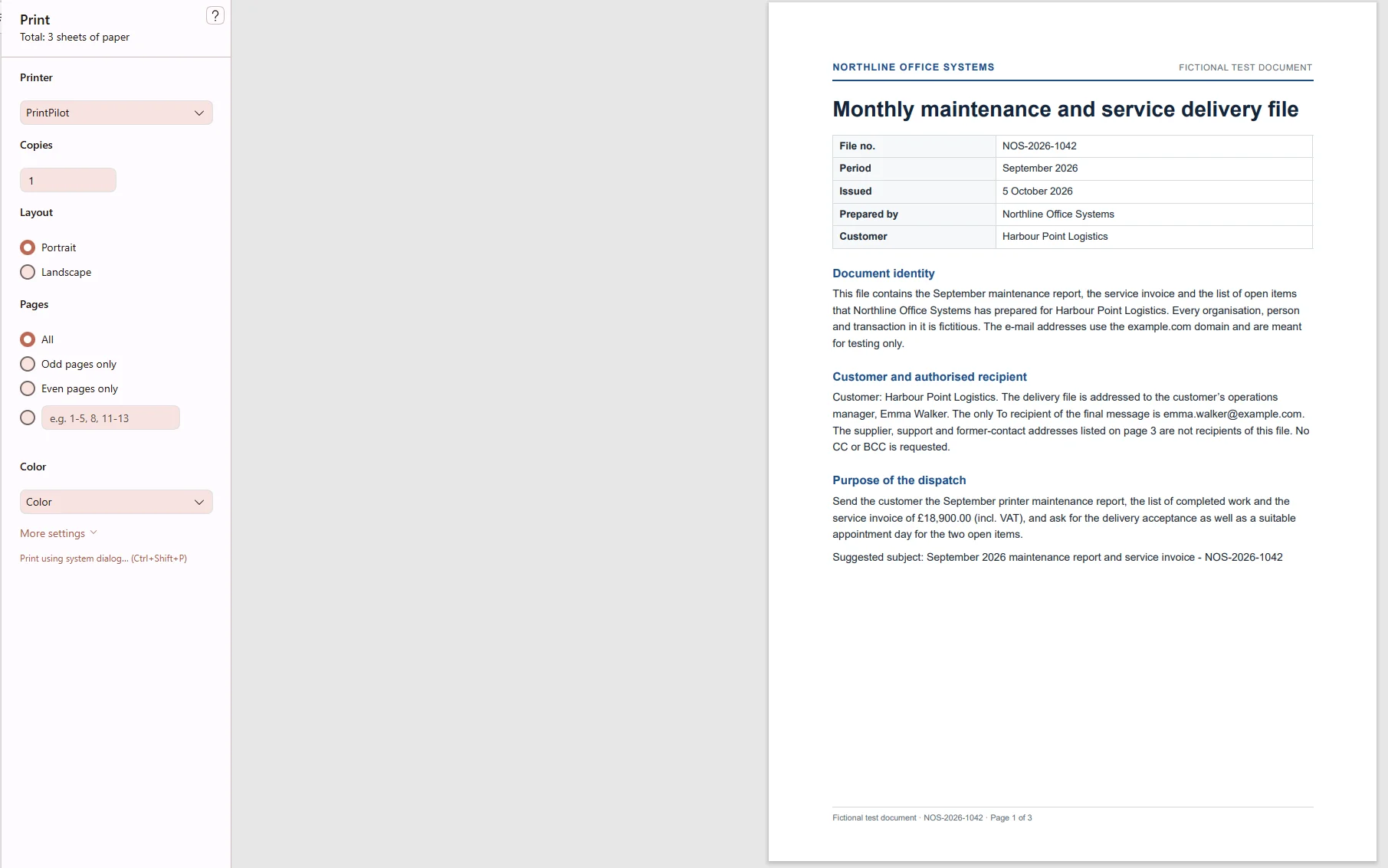
Selecting the PrintPilot virtual printer in the Windows Print dialog
4Step 2: Connect Microsoft 365 (Graph API), Gmail or SMTP once
In the PrintPilot dashboard under Email -> Add a sender, connect your Microsoft 365 / Outlook account via Microsoft Graph API (Mail.Send) OAuth 2.0, your Google account via Gmail OAuth 2.0, or any internal SMTP mailbox. Tokens stay encrypted locally with Windows DPAPI.
Sent invoices still appear in your Sent folder and replies return to your regular mailbox—even when New Outlook is the only mail app open.
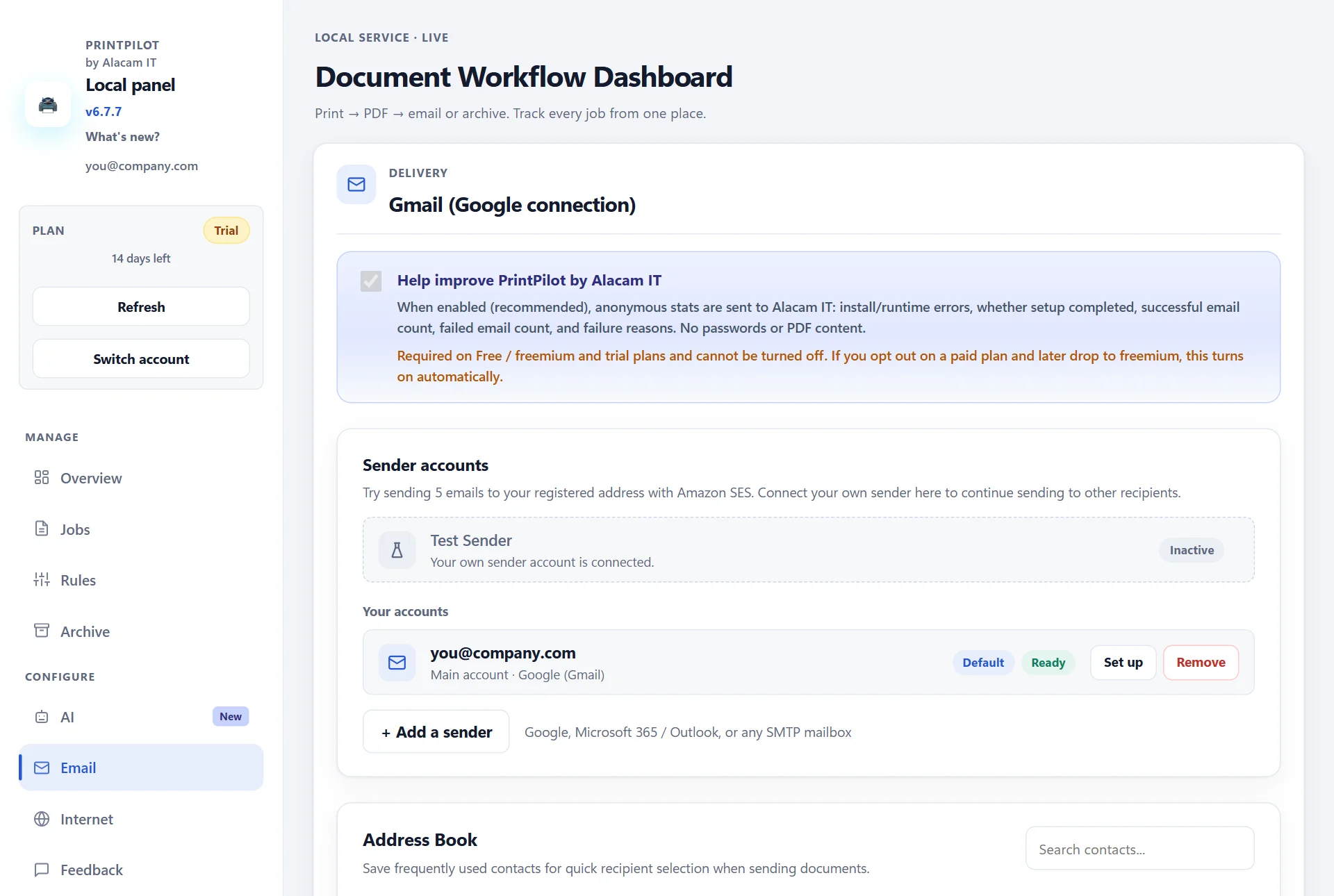
PrintPilot dashboard: Email page with connected Microsoft 365 and Gmail OAuth senders
5Step 3: Automate recurring recipients with rules or AI drafts
Use Rules for recurring addresses (such as accounting or fixed client contacts) with {fileName} placeholders and automatic local archiving. On paid plans, the optional AI assistant can read the printed PDF and pre-fill the recipient email named on the invoice, a subject and a short message for your review before you click Send.
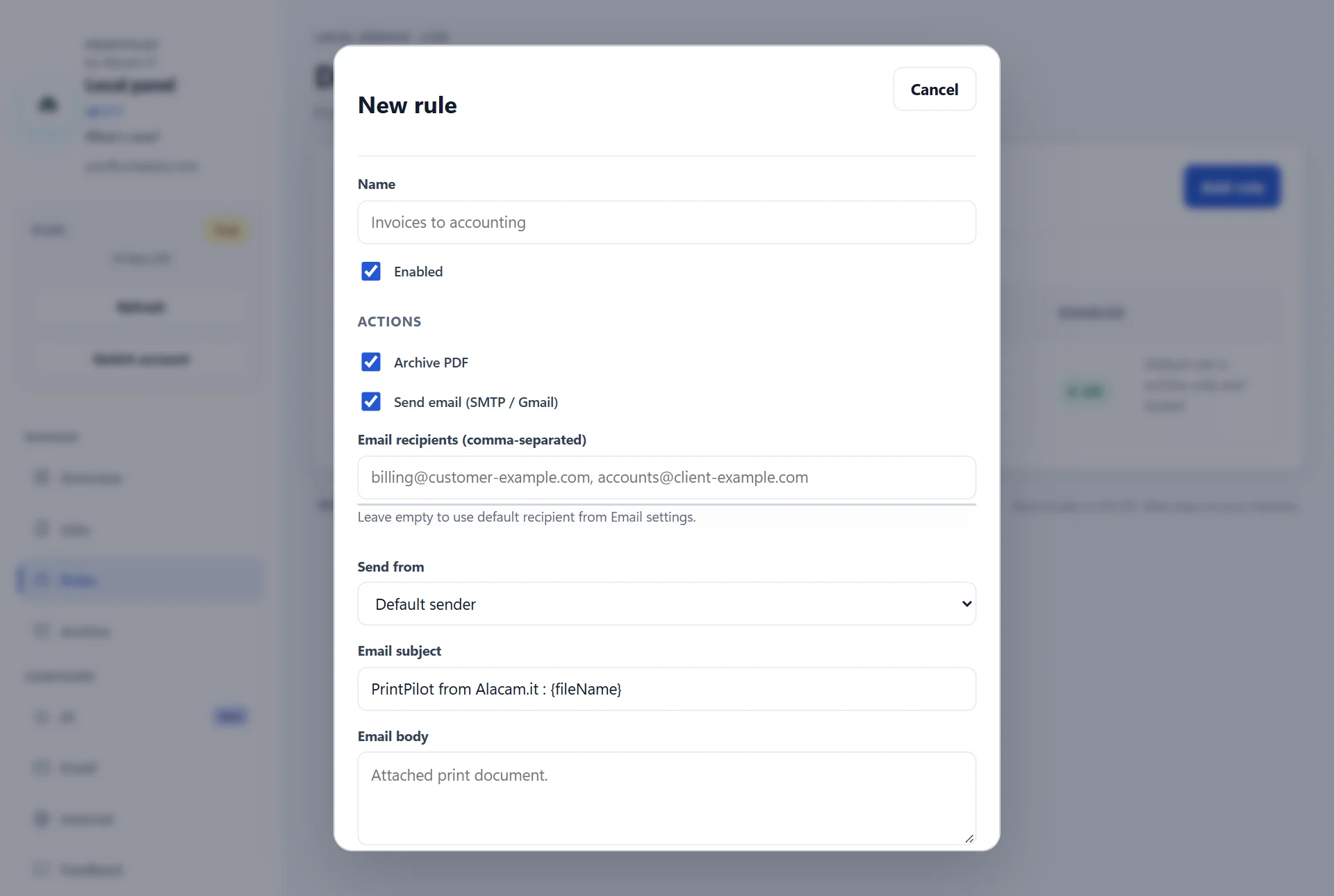
PrintPilot dashboard: saved delivery rule automating subject, recipients and archive
Frequently Asked Questions (FAQ)
Does New Outlook for Windows support Simple MAPI?
No. Microsoft documents that MAPI integration, COM add-ins and the Outlook Object Model are not supported in New Outlook for Windows.
Why does QuickBooks or SAP fail to attach PDFs when New Outlook is default?
Because QuickBooks Desktop, SAP GUI and many Windows apps invoke Simple MAPI (MAPISendMail) or Outlook COM automation, which New Outlook does not implement.
Does PrintPilot require Classic Outlook or MAPI to be installed?
No. PrintPilot works with zero dependency on Classic Outlook, New Outlook or MAPI. You print to the PrintPilot virtual printer and PrintPilot sends the PDF directly via Microsoft Graph, Gmail API or SMTP.
Will sent invoices appear in my New Outlook Sent Items folder?
Yes. When you connect your Microsoft 365 or Outlook account in PrintPilot via Microsoft Graph (Mail.Send), messages are sent from your real mailbox and appear in Sent Items in New Outlook and Outlook on the web.
Can PrintPilot be deployed silently across finance or ERP workstations?
Yes. PrintPilot provides a silent MSI installer (msiexec /qn with setup.ini) for Intune and Active Directory GPO, as well as Microsoft Store deployment.
Related articles
December 2026 Exchange Online SMTP AUTH Deprecation (Error 550 5.7.30): OAuth 2.0 Guide for Legacy ERP
Microsoft disables Basic Auth for Exchange Online SMTP AUTH by default at the end of December 2026. Prevent 550 5.7.30 errors in legacy ERP and accounting apps using PrintPilot with Microsoft Graph OAuth 2.0.
SMTP Error 535 5.7.3 Outlook Authentication Unsuccessful: Causes & OAuth 2.0 Fix
Fix 535 5.7.3 Authentication unsuccessful on smtp.office365.com:587. Diagnose Authenticated SMTP, Security Defaults and MFA, or switch desktop print-to-email workflows to Microsoft Graph OAuth 2.0 with PrintPilot.
PrintPilot Printer Missing? Repair Microsoft Print to PDF in 2 Minutes
PrintPilot says it could not create its printer? Turn the Windows feature Microsoft Print to PDF off and on again, restart, and PrintPilot creates its printer. Step-by-step with video.
Start Automating Your Workflows Today
Stop fighting MAPI errors and 32-bit/64-bit Outlook mismatches. Print from SAP, QuickBooks or any Windows ERP directly to PrintPilot and send PDFs reliably from your own mailbox.
Download PrintPilot Free Trial