December 2026 Exchange Online SMTP AUTH Deprecation (Error 550 5.7.30): OAuth 2.0 Guide for Legacy ERP
Microsoft disables Basic Auth for Exchange Online SMTP AUTH by default at the end of December 2026. Prevent 550 5.7.30 errors in legacy ERP and accounting apps using PrintPilot with Microsoft Graph OAuth 2.0.
For years, legacy ERP tools, desktop accounting packages and custom billing apps sent invoices through smtp.office365.com using only a username and password. Under Microsoft's Exchange Online deprecation schedule (revised January 27, 2026), Basic authentication for SMTP AUTH is disabled by default for existing tenants at the end of December 2026, unavailable by default for new tenants created afterward, and permanently removed on a date to be announced in the second half of 2027—leaving password-only senders with error 550 5.7.30 Basic authentication is not supported for Client Submission.
Auto Print to PDF & Send Email with PrintPilot
Stop wasting time on manual document printing. Start your free trial.
1What changes in December 2026 and what 550 5.7.30 means
According to Microsoft's Exchange Team timeline (updated January 27, 2026), Basic authentication for Client Submission (SMTP AUTH) is switched off by default for existing Microsoft 365 tenants at the end of December 2026. New tenants created after December 2026 will not have Basic Auth for SMTP AUTH enabled by default.
In the second half of 2027, Microsoft plans to announce the final permanent removal date. Once Basic Auth is removed—or already disabled by Security Defaults or Conditional Access—legacy clients attempting username/password login on smtp.office365.com receive authentication rejections such as 535 5.7.3 or 550 5.7.30 Basic authentication is not supported for Client Submission.
2Why old ERP and accounting apps cannot switch to OAuth on their own
Many desktop ERP, POS and accounting applications were designed around simple SMTP settings: a host, a port, a username and a password. They do not include an interactive OAuth 2.0 browser flow or token refresh logic, and updating the source code of a closed or older vendor product is often impossible or cost-prohibitive.
Instead of modifying the ERP's internal mail module, you can bypass SMTP Basic Auth completely by printing the invoice or report through a modern virtual printer.
| Approach | Auth method | Survives 2026–2027 removal? | Changes to legacy ERP |
|---|---|---|---|
| Re-enable Basic Auth temporarily | Username + password (SMTP AUTH) | No — temporary stopgap only until final removal | None |
| Exchange Online Direct Send / Relay connector | Static IP or certificate connector | Yes, if IP/TLS rules are maintained | Requires SMTP server reconfiguration & SPF/TLS setup |
| PrintPilot virtual printer | Microsoft Graph API (Mail.Send) OAuth 2.0 or Gmail OAuth 2.0 | Yes — uses modern OAuth 2.0 instead of Basic Auth | None — print to the PrintPilot printer |
3Step 1: Audit which mailboxes still rely on SMTP Basic Auth
Before changing settings, check the Exchange Admin Center under Reports -> Mail flow -> SMTP AUTH Clients Submission report to list every application or device still authenticating with Basic Auth.
You can also inspect your tenant and mailbox settings in Exchange Online PowerShell to see whether SMTP AUTH is currently enabled or disabled.
# Verify current Exchange Online SMTP AUTH configuration
Connect-ExchangeOnline

# Check tenant-wide SMTP AUTH setting
Get-TransportConfig | Format-List SmtpClientAuthenticationDisabled

# Check a specific ERP / billing mailbox
Get-CASMailbox -Identity billing@example.com | Format-List SmtpClientAuthenticationDisabled4Step 2: Connect Microsoft 365 via Microsoft Graph API (Mail.Send) in PrintPilot
PrintPilot installs as a standard Windows virtual printer on Windows 10, Windows 11 and Windows Server 2016/2019/2022. Rather than connecting to smtp.office365.com with a static password, PrintPilot sends Microsoft 365 / Outlook emails via the Microsoft Graph API (Mail.Send) using OAuth 2.0.
Install PrintPilot, open the local dashboard, go to Email -> Add a sender, and sign in with your Microsoft 365 or Outlook account (or connect Gmail OAuth 2.0 or an approved internal SMTP relay). OAuth tokens are encrypted locally on the PC with Windows DPAPI.
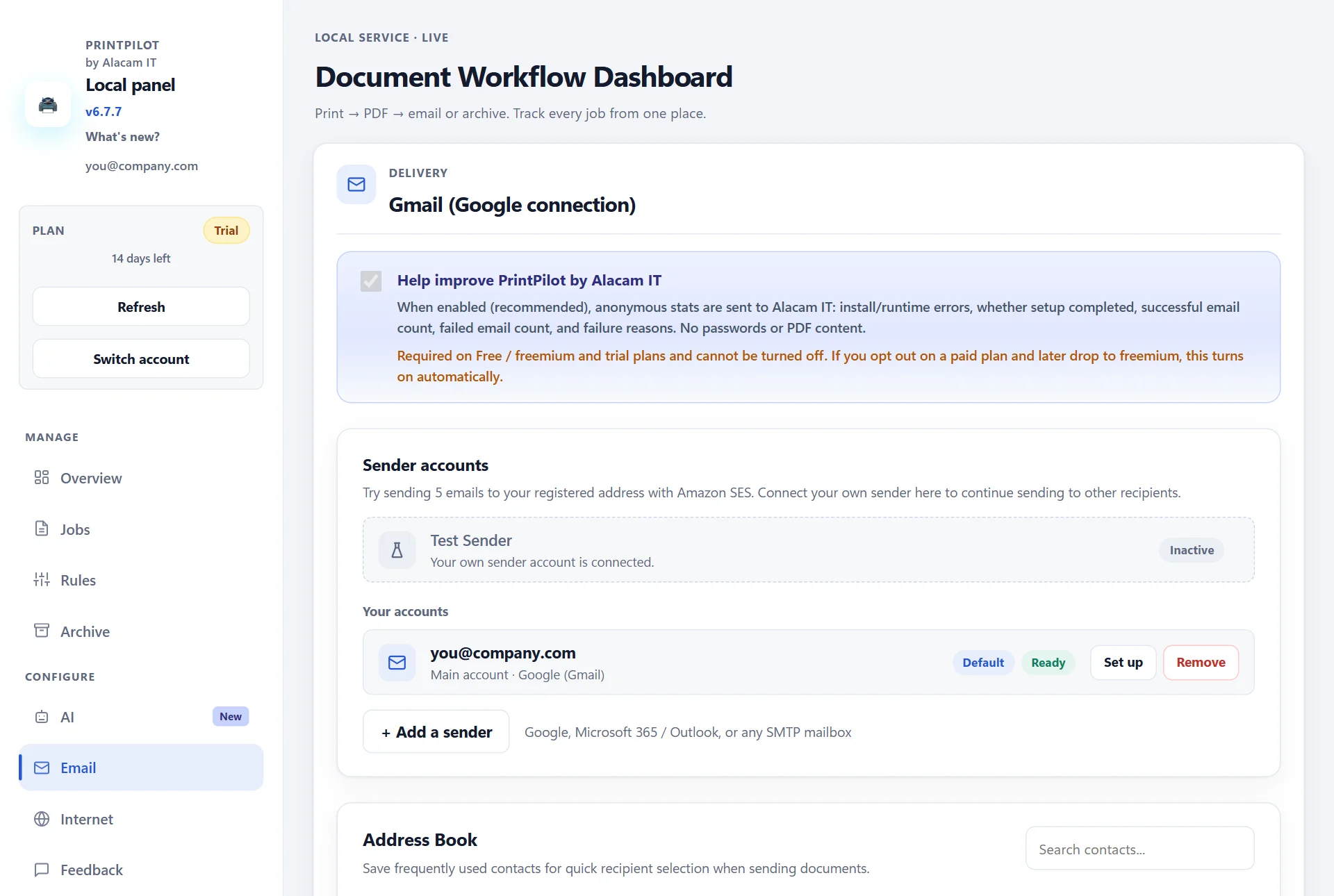
PrintPilot dashboard: Email page with connected OAuth sender accounts
5Step 3: Set up routing rules and print directly from your ERP
In Rules, create a rule for recurring recipients—such as finance, warehouse or specific clients—with pre-filled subject placeholders like {fileName} and automatic local PDF archiving.
Whenever an operator presses Print in SAP, QuickBooks, Logo, DATEV or an older Windows ERP and picks the PrintPilot printer, PrintPilot generates the PDF locally and delivers it through Microsoft Graph without touching legacy SMTP AUTH.
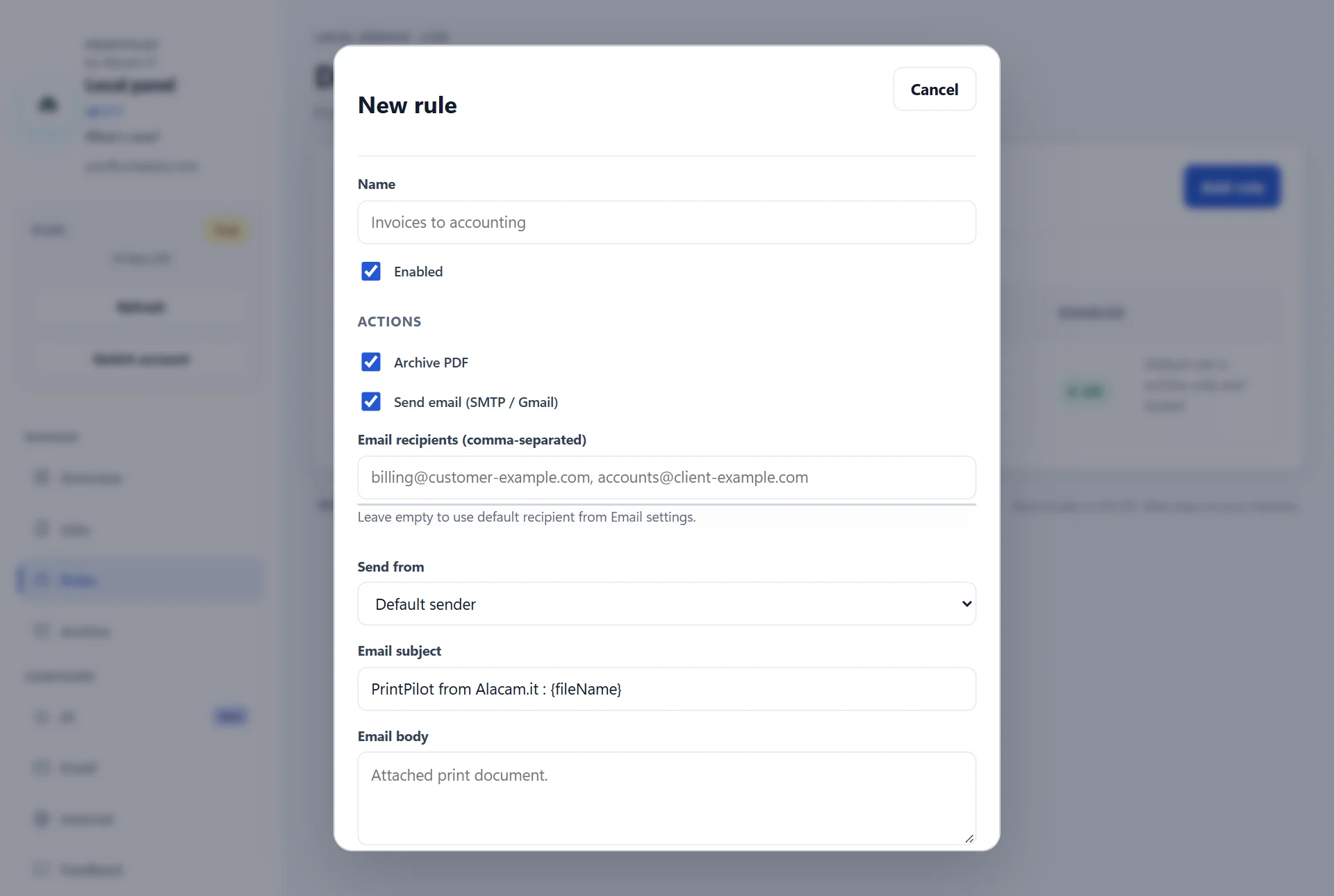
PrintPilot dashboard: creating a delivery rule for printed ERP documents
6Step 4: Monitor delivery and automatic retries in Jobs
Every print job is logged in the Jobs view with status tracking (Delivered, Archived, Retry or Failed) and automatic retry if the internet connection drops temporarily. PDFs never pass through Alacam IT servers when sending via your connected mailbox.
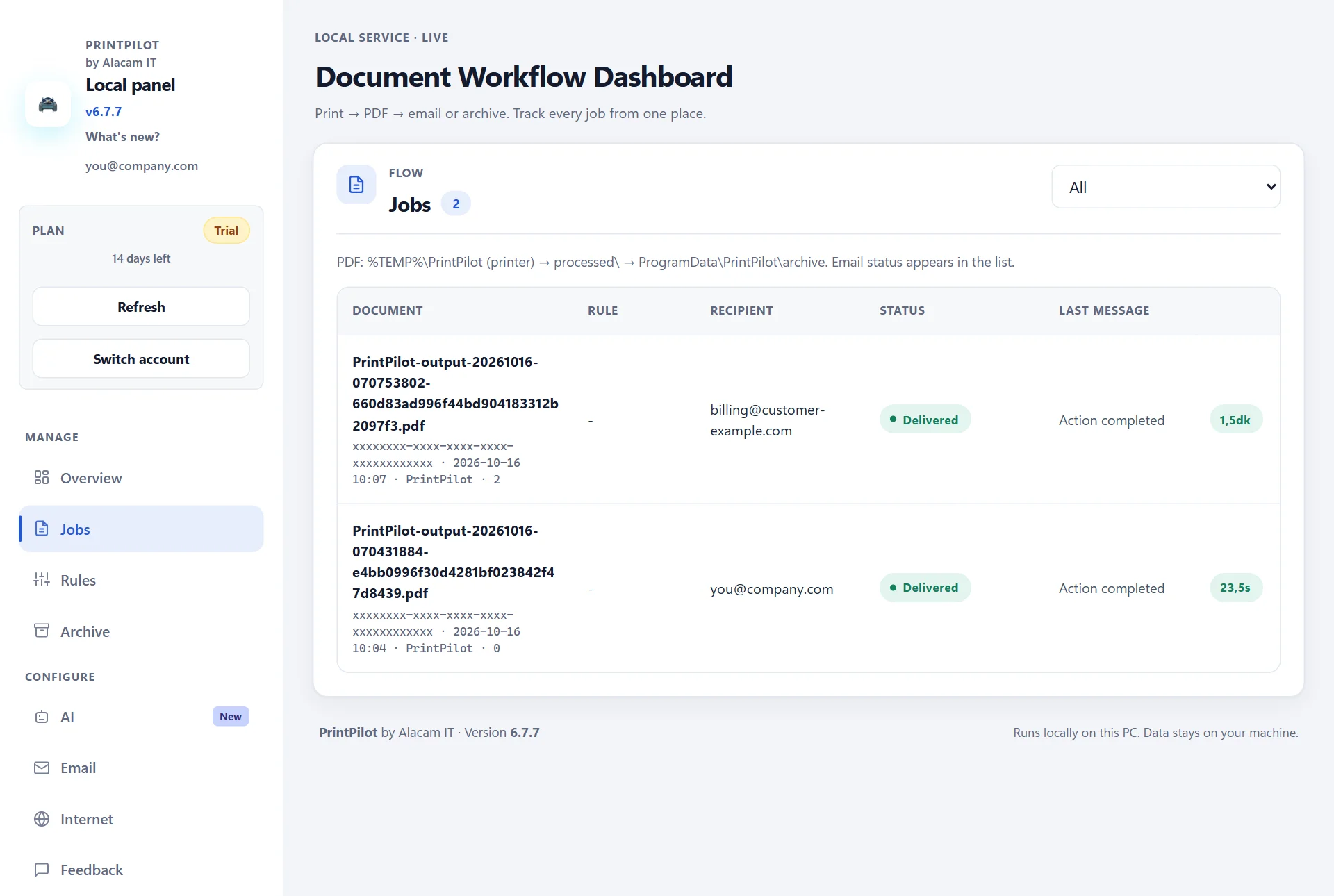
PrintPilot dashboard: Jobs list confirming delivered PDF emails
Frequently Asked Questions (FAQ)
What does error 550 5.7.30 Basic authentication is not supported for Client Submission mean?
It means Exchange Online rejected an SMTP login that used a plain username and password because Basic authentication for SMTP AUTH is disabled or retired for that tenant.
Can I still re-enable SMTP Basic Auth after December 2026?
For existing tenants, administrators can temporarily turn Basic Auth back on after the December 2026 default change, until Microsoft's final removal date announced in H2 2027. Tenants created after December 2026 have it off by default.
Does PrintPilot use SMTP AUTH or Microsoft Graph API?
PrintPilot connects to Microsoft 365 and Outlook accounts using Microsoft Graph API (Mail.Send) with OAuth 2.0, so it does not depend on legacy SMTP Basic Auth on smtp.office365.com.
Does Entra ID require Admin Consent for PrintPilot?
In managed Microsoft 365 organizations where user consent is restricted—or while publisher verification is pending—an Entra ID administrator may need to approve the Mail.Send permission once for the tenant.
How much does PrintPilot cost?
PrintPilot includes a 14-day full-featured free trial with no credit card, followed by a free Freemium tier (15 emails/month) or paid plans starting at €4.90/month per device.
Related articles
How to Automatically Print to PDF and Send Email from Any Windows App
Stop saving PDFs manually. Learn how to turn any Ctrl+P print job from Chrome, Excel, your ERP or QuickBooks into an emailed PDF attachment automatically with PrintPilot.
New Outlook MAPI Attachment Failure: Virtual Printer Fix for SAP & QuickBooks
New Outlook for Windows does not support MAPI, breaking email attachments in SAP GUI and QuickBooks. Print to PrintPilot to send PDFs via Microsoft Graph OAuth 2.0 or Gmail without MAPI.
SMTP Error 535 5.7.3 Outlook Authentication Unsuccessful: Causes & OAuth 2.0 Fix
Fix 535 5.7.3 Authentication unsuccessful on smtp.office365.com:587. Diagnose Authenticated SMTP, Security Defaults and MFA, or switch desktop print-to-email workflows to Microsoft Graph OAuth 2.0 with PrintPilot.
Start Automating Your Workflows Today
Do not wait for legacy ERP mailers to fail with 550 5.7.30. Install PrintPilot, connect Microsoft 365 via Microsoft Graph OAuth 2.0 and keep every printed invoice flowing smoothly.
Download PrintPilot Free Trial