SMTP Error 535 5.7.3 Outlook Authentication Unsuccessful: Causes & OAuth 2.0 Fix
Fix 535 5.7.3 Authentication unsuccessful on smtp.office365.com:587. Diagnose Authenticated SMTP, Security Defaults and MFA, or switch desktop print-to-email workflows to Microsoft Graph OAuth 2.0 with PrintPilot.
Many Windows print-to-email tools, ERP modules and desktop billing utilities suddenly stop sending through Outlook or Microsoft 365 with error 535 5.7.3 Authentication unsuccessful. Even when the mailbox password is correct, Microsoft 365 blocks password-based SMTP logins whenever Authenticated SMTP is disabled, Entra ID Security Defaults or Conditional Access blocks legacy auth, per-user MFA is active, or Basic Auth is restricted ahead of Microsoft's Exchange Online SMTP AUTH phase-out. This guide breaks down what 535 5.7.3 means, how to diagnose it, and how to move print-to-email workflows to modern OAuth 2.0.
Auto Print to PDF & Send Email with PrintPilot
Stop wasting time on manual document printing. Start your free trial.
1Why Outlook / Microsoft 365 returns 535 5.7.3 Authentication unsuccessful
When a Windows application connects to smtp.office365.com on port 587 with STARTTLS, Microsoft 365 checks multiple layers before accepting credentials:
1. Authenticated SMTP may be disabled at the organization or mailbox level. 2. Microsoft Entra ID Security Defaults or a Conditional Access policy explicitly blocks legacy authentication protocols. 3. Per-user MFA is enforced on the account, so standard passwords are rejected for SMTP AUTH. 4. The legacy client uses TLS 1.0/1.1 instead of TLS 1.2+, or sends an expired app password / incorrect XOAUTH2 scope.
| SMTP Error Code | Exact Cause in Microsoft 365 | Why Desktop Print Tools Hit It |
|---|---|---|
| 535 5.7.3 Authentication unsuccessful | Login rejected: Authenticated SMTP off, Security Defaults / CA policy, MFA, wrong credentials or TLS < 1.2 | Legacy tool sends username + password over smtp.office365.com:587 |
| 550 5.7.30 Basic authentication is not supported | Basic Auth for SMTP AUTH disabled by default (Dec 2026) or permanently removed | Client lacks modern OAuth 2.0 flow and continues using Basic Auth |
| 530 5.7.57 Client was not authenticated | Client attempted MAIL FROM before completing AUTH / STARTTLS handshake | Missing TLS 1.2+ or SMTP authentication toggle unchecked |
2Step 1: Verify Authenticated SMTP and Entra ID policies in PowerShell
Before changing software settings, check whether Authenticated SMTP is disabled on the tenant or mailbox using Exchange Online PowerShell. Remember that even if SmtpClientAuthenticationDisabled is set to $false, Entra ID Security Defaults or Conditional Access will still reject Basic Auth with 535 5.7.3.
Also note Microsoft's Exchange Team timeline: Basic Auth for SMTP AUTH is disabled by default for existing tenants at the end of December 2026 and permanently removed following the second half of 2027 announcement—making SMTP Basic Auth overrides only a temporary bridge.
# Diagnose 535 5.7.3 Authenticated SMTP settings in Exchange Online
Connect-ExchangeOnline

# 1. Check tenant-level SMTP AUTH setting
Get-TransportConfig | Format-List SmtpClientAuthenticationDisabled

# 2. Check mailbox-level Authenticated SMTP override
Get-CASMailbox -Identity billing@example.com | Format-List SmtpClientAuthenticationDisabled

# 3. Temporary transition override (if tenant policy permits)
# Set-CASMailbox -Identity billing@example.com -SmtpClientAuthenticationDisabled $false3Step 2: Replace legacy SMTP logins with Microsoft Graph API (Mail.Send) OAuth 2.0
Rather than weakening tenant security or maintaining fragile app passwords in legacy print-to-email utilities, switch your print-to-email pipeline to PrintPilot.
PrintPilot connects Microsoft 365 and Outlook mailboxes via Microsoft Graph API (Mail.Send) using OAuth 2.0—no smtp.office365.com password or legacy SMTP AUTH toggle required. Open the PrintPilot dashboard, select Email -> Add a sender, and sign in cleanly with Microsoft 365 or Gmail OAuth 2.0. Tokens are stored locally on Windows encrypted with Windows DPAPI.
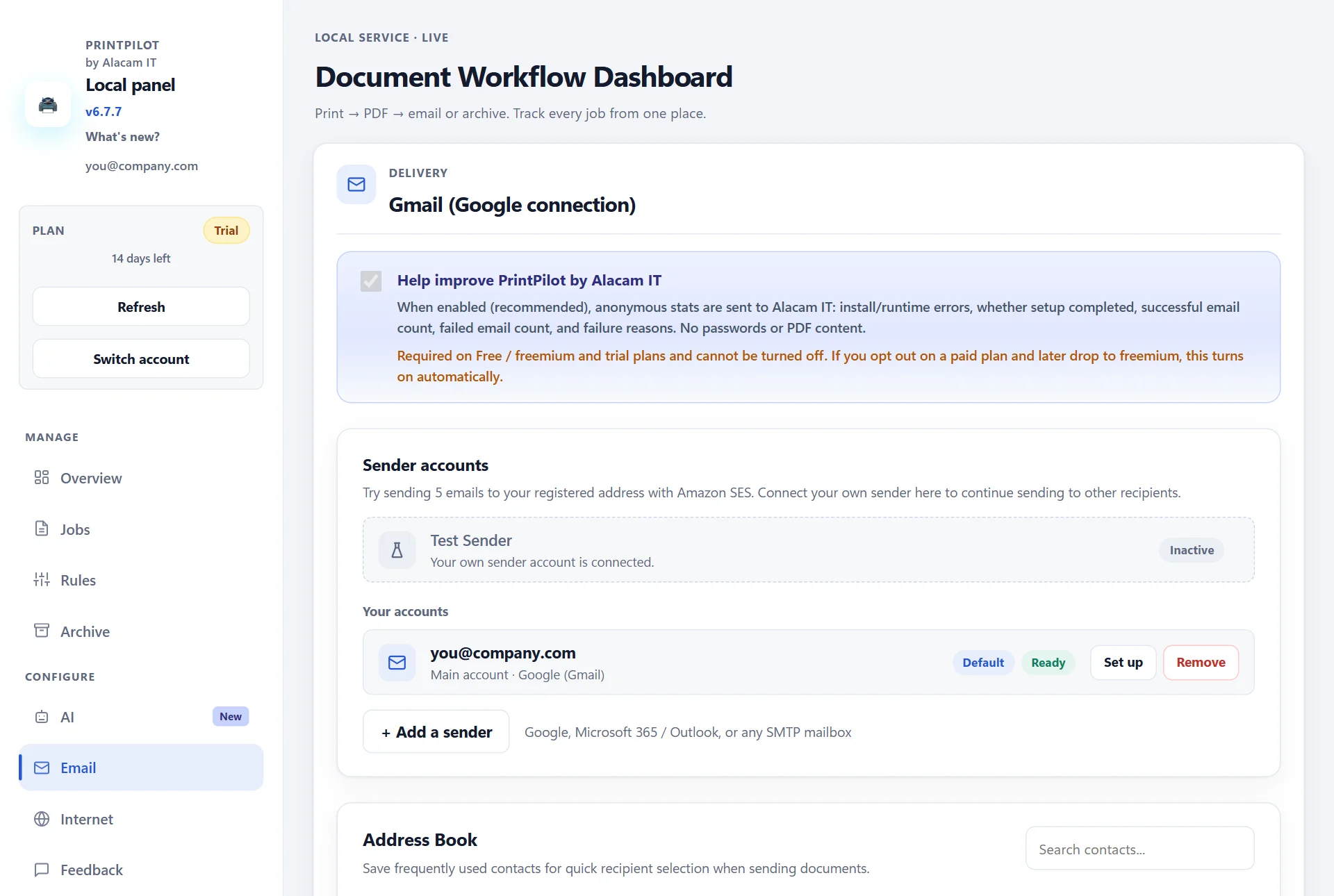
PrintPilot Email page showing OAuth 2.0 sender configuration without SMTP Basic Auth
4Step 3: Print from any Windows app and let rules or AI prepare the email
Once your sender account is connected, select the PrintPilot virtual printer in Ctrl+P from your accounting package, ERP, Excel or browser. PrintPilot converts the print job into a local PDF.
You can dispatch automatically with saved routing rules (To, Cc, subject template, local PDF archive) or, on paid plans, use the optional AI assistant to extract the recipient email, subject and draft body from the printed document for review before sending.
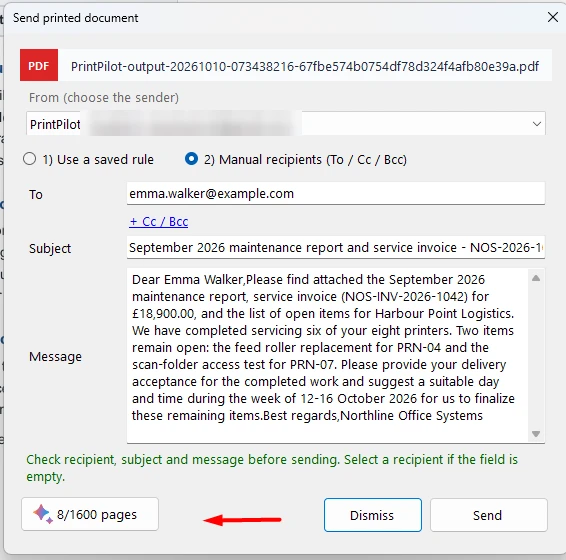
PrintPilot AI draft window reviewing recipient and attachment from a printed PDF
5Step 4: Track deliveries, Sent folder sync and automatic retries
Because PrintPilot uses Microsoft Graph (Mail.Send), sent invoices appear automatically in the sender's Sent Items folder in Outlook. Every job is tracked locally in the Jobs log with automatic retries if connectivity drops.
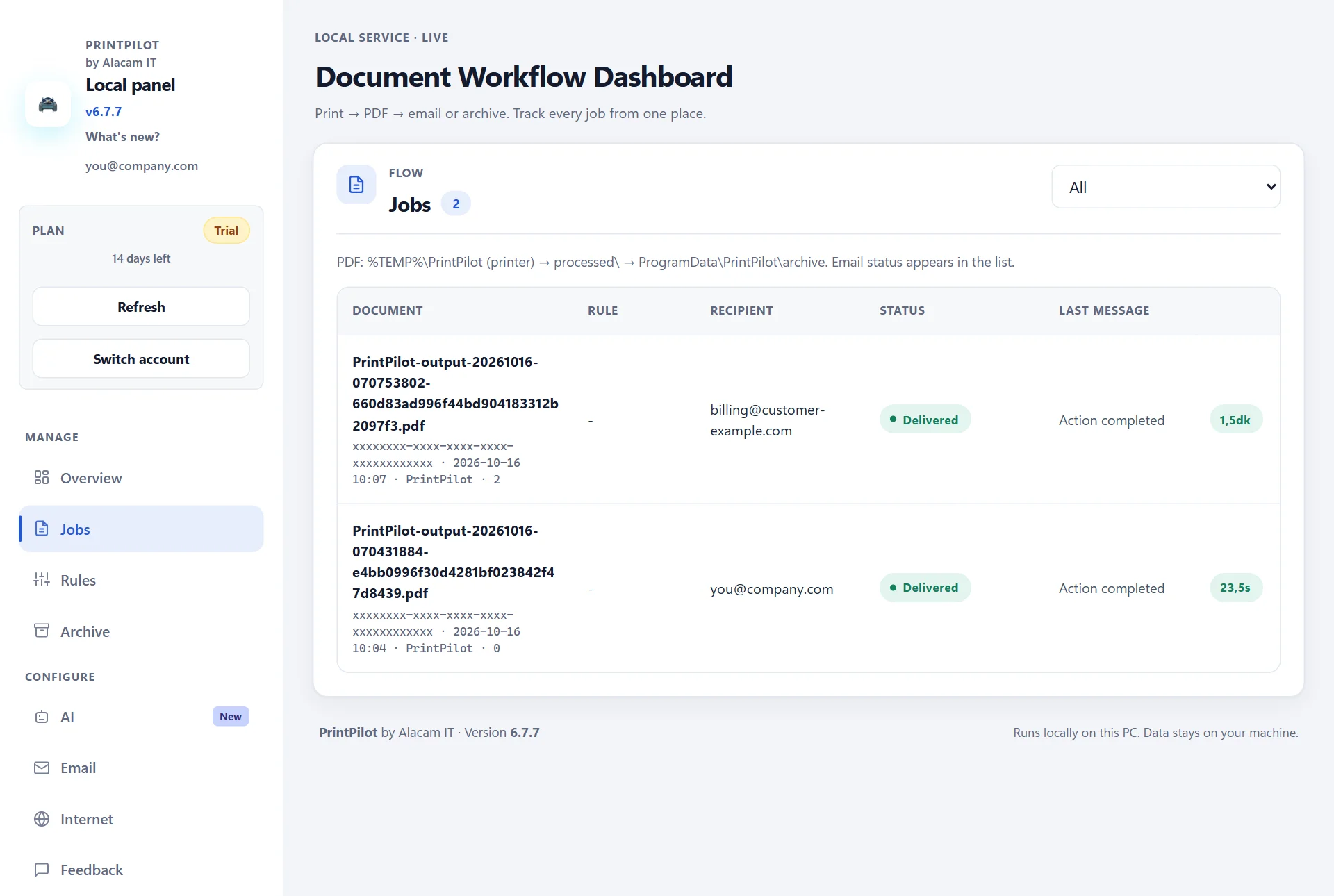
PrintPilot Jobs log confirming successful email delivery via OAuth 2.0
Frequently Asked Questions (FAQ)
What is the difference between 535 5.7.3 and 550 5.7.30 in Exchange Online?
535 5.7.3 means SMTP authentication failed due to disabled Authenticated SMTP, Security Defaults/Conditional Access, MFA, TLS version or credentials. 550 5.7.30 means Basic Auth for Client Submission is unsupported or retired on the tenant.
Why does 535 5.7.3 happen even when my Outlook password works in a browser?
Browser sign-ins use modern OAuth 2.0 with MFA, whereas legacy desktop tools send a password over SMTP AUTH—which Entra ID Security Defaults, Conditional Access or mailbox policies block.
Does PrintPilot need SMTP AUTH enabled to send via Microsoft 365?
No. PrintPilot sends Microsoft 365 and Outlook emails through Microsoft Graph API (Mail.Send) with OAuth 2.0, so SMTP AUTH can stay disabled.
Does corporate Microsoft 365 require Entra ID Admin Consent for PrintPilot?
Yes, in organizations that restrict user consent or while publisher verification on Azure is being completed, a Microsoft 365 administrator may need to grant Admin Consent once. Gmail OAuth 2.0 and custom internal SMTP relays work as alternatives.
Can IT deploy PrintPilot across multiple Windows PCs silently?
Yes. PrintPilot provides a 64-bit MSI installer supporting msiexec /qn with SETUPINI for Microsoft Intune and Active Directory GPO, as well as Microsoft Store package 9MZZX9M0K7R2.
Related articles
New Outlook MAPI Attachment Failure: Virtual Printer Fix for SAP & QuickBooks
New Outlook for Windows does not support MAPI, breaking email attachments in SAP GUI and QuickBooks. Print to PrintPilot to send PDFs via Microsoft Graph OAuth 2.0 or Gmail without MAPI.
PrintPilot Printer Missing? Repair Microsoft Print to PDF in 2 Minutes
PrintPilot says it could not create its printer? Turn the Windows feature Microsoft Print to PDF off and on again, restart, and PrintPilot creates its printer. Step-by-step with video.
December 2026 Exchange Online SMTP AUTH Deprecation (Error 550 5.7.30): OAuth 2.0 Guide for Legacy ERP
Microsoft disables Basic Auth for Exchange Online SMTP AUTH by default at the end of December 2026. Prevent 550 5.7.30 errors in legacy ERP and accounting apps using PrintPilot with Microsoft Graph OAuth 2.0.
Start Automating Your Workflows Today
Stop fighting 535 5.7.3 rejections and Security Defaults conflicts. Switch desktop print-to-email workflows to PrintPilot and deliver PDFs over Microsoft Graph API (Mail.Send) OAuth 2.0 or Gmail OAuth 2.0.
Download PrintPilot Free Trial