PrintPilot, Bullzip and PDFCreator Compared: Virtual Printers That Email PDFs (2026)
A fact-checked comparison of PrintPilot, Bullzip PDF Printer, PDFCreator and Microsoft Print to PDF: price, email delivery, Gmail and Microsoft 365 sign-in, local processing and silent MSI installation.
Looking for a virtual printer that emails PDFs brings up the same names again and again. This comparison puts PrintPilot, Bullzip PDF Printer, PDFCreator and the built-in Microsoft Print to PDF side by side on price, email delivery, sign-in options, local processing and silent installation. PrintPilot is made by Alacam IT, the publisher of this blog, so for the other tools we only used facts their vendors publish.
Auto Print to PDF & Send Email with PrintPilot
Stop wasting time on manual document printing. Start your free trial.
1Comparison table
We compared the four tools on what matters when the goal is to email printed documents from Windows. Facts about Bullzip PDF Printer and PDFCreator come from their official websites and documentation, checked on 16 October 2026.
| Tool | Price for business use | Email delivery | Gmail / Microsoft 365 sign-in | Runs locally | Silent install / MSI |
|---|---|---|---|---|---|
| PrintPilot | 14-day free trial, then free for 15 emails a month; paid plans from €4.90 per device per month | Built in: every print opens a send window with saved rules, To/Cc/Bcc and an optional AI draft | Yes: Google and Microsoft 365 sign-in, or any SMTP mailbox | Yes: the PDF is created and sent from your PC | Yes: MSI with /qn and setup.ini, plus Microsoft Store |
| Bullzip PDF Printer | Free version for personal use; commercial editions are a one-time purchase from $29 (Standard), $69 (Professional) or $139 (Expert) per user | SMTP sending (added in version 10, 2020) and opening a new email with the PDF attached | Not mentioned on bullzip.com | Yes (requires Ghostscript) | Unattended setup; a custom MSI or the enterprise edition is recommended |
| PDFCreator | Free edition for personal use only; business editions are yearly subscriptions per workstation (Professional) or per server (Terminal Server, Server) | Email through your default mail program; SMTP accounts in the settings | Microsoft account with an Outlook Web Access action; Gmail not mentioned | Yes | MSI package and Group Policies in the business editions |
| Microsoft Print to PDF | Included in Windows | None: it only saves a PDF file | No | Yes | Built into Windows |
2PrintPilot: made to send every print
PrintPilot installs a printer called PrintPilot. Every document you print to it becomes a PDF and opens a Send printed document window, where you pick a saved rule or type the recipients and press Send. You connect your own Google, Microsoft 365 or Outlook account, or any SMTP mailbox, so emails go out from your address and appear in your Sent folder.
Rules store recipients, sender, subject and body; a Jobs list shows what was delivered; and failed sends are retried. On paid plans, an AI assistant reads the PDF and suggests the recipient named in it, a subject and a message. PrintPilot runs on Windows 10 and 11 and installs silently from an MSI, which matters when you roll it out to many PCs.
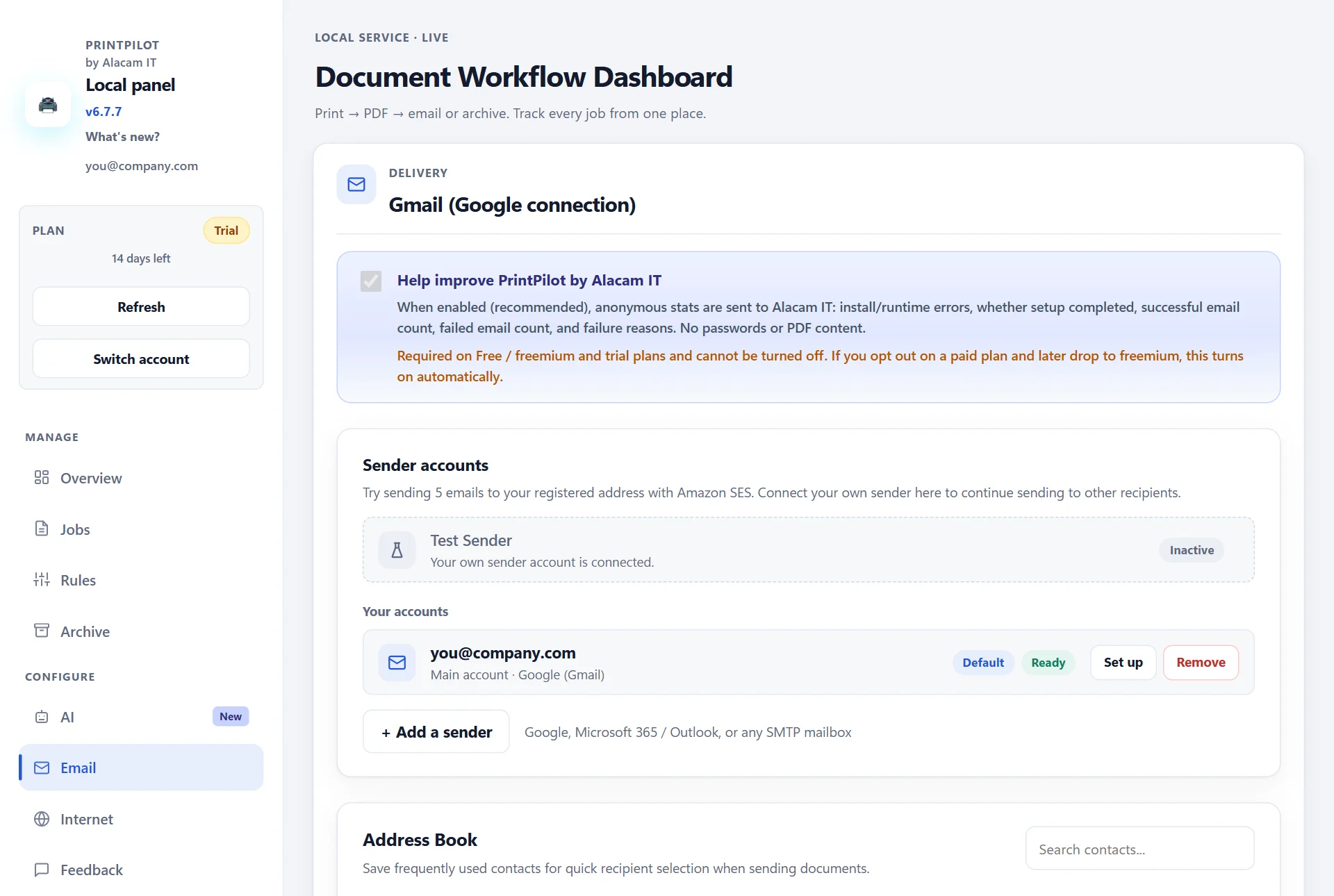
PrintPilot dashboard: sender accounts with Google, Microsoft 365 / Outlook or any SMTP mailbox
3Bullzip PDF Printer: a PDF printer with one-time pricing
Bullzip PDF Printer is a long-standing PDF printer for Windows 11 back to Windows XP and Windows Server 2025 back to 2003. It needs Ghostscript, which the installer can download, and a command-line interface controls all its settings. The version history lists sending mail through SMTP since version 10 (2020); the website does not say which edition includes it.
Bullzip offers a free version for personal use and commercial editions for business use, sold as a one-time payment per user: $29 Standard, $69 Professional and $139 Expert, with lower per-user prices for volume licences. It is a good fit when you mainly need a configurable PDF printer and email is occasional.
4PDFCreator: editions for terminal servers and automation
PDFCreator by pdfforge comes in four editions: Free, Professional, Terminal Server and Server. The free edition is for personal use; pdfforge states that commercial use requires one of its business editions. Professional is licensed per workstation and Terminal Server per server, both as yearly subscriptions, with an MSI package, Group Policy support, a COM interface and C# scripting.
For email, PDFCreator can attach the PDF to a new message in your default mail program, and its settings include SMTP and Microsoft accounts, the latter with an Outlook Web Access action. It is a strong choice for Citrix or Remote Desktop servers and for teams that script PDF creation.
5Microsoft Print to PDF: free, but no email
Every copy of Windows 10 and 11 includes Microsoft Print to PDF. It turns any print into a PDF file and asks where to save it. It cannot email anything, so you still attach the file by hand. PrintPilot actually builds its printer on this Windows driver and adds the sending part on top.
6Which one should you choose?
Choose PrintPilot if most printed documents need to reach someone by email, such as invoices, delivery notes or reports, and you want to send from Gmail or Microsoft 365 without typing an SMTP password.
Choose Bullzip PDF Printer if you mainly need a configurable PDF printer, send email only now and then, and prefer to pay once.
Choose PDFCreator if you run Citrix or Remote Desktop servers, or want to automate PDF creation with COM or C# scripts.
Stay with Microsoft Print to PDF if you only need to save PDF files.
7How we checked these facts
Bullzip information comes from the Bullzip PDF Printer product page and buy page on bullzip.com. PDFCreator information comes from the editions pages on pdfforge.org and the Email a PDF and Accounts pages of the PDFCreator manual on docs.pdfforge.org. Prices change, so check the vendor's site before you buy. If you spot something out of date, tell us at contact@alacam.it and we will correct it.
Bullzip PDF Printer and PDFCreator are trademarks of their respective owners. Alacam IT is not affiliated with or endorsed by them.
Frequently Asked Questions (FAQ)
Which virtual printer can email a PDF automatically?
PrintPilot is built for it: every print opens a send window and goes out from your Gmail, Microsoft 365 or SMTP account. Bullzip PDF Printer and PDFCreator can also send email, through SMTP or a mail program, but they are PDF printers first.
Is Bullzip PDF Printer free for business use?
Bullzip describes its free version as being for personal use and sells commercial editions for commercial use, from $29 per user as a one-time payment.
Is PDFCreator free for commercial use?
No. pdfforge states that commercial use requires one of its business editions (Professional, Terminal Server or Server), which are yearly subscriptions.
Can PrintPilot send email without Outlook?
Yes. PrintPilot connects directly to Google, Microsoft 365 or any SMTP mailbox, so no mail program needs to be installed or open.
Which of these can be deployed silently to many PCs?
PrintPilot installs silently from its MSI with msiexec /qn and can link each PC to your account through a setup.ini file. PDFCreator's business editions offer an MSI package and Group Policies, and Bullzip's setup can run unattended.
Start Automating Your Workflows Today
If the reason you print is to send, pick the tool built for sending. Download PrintPilot, connect your mail account and try it free for 14 days on your own documents.
Download PrintPilot Free Trial